From Factory Floor to the CloudSAP S/4HANA on AWS with Multi-Firewall Security & Disaster Recovery
How a confidential automotive manufacturer moved SAP ECC to S/4HANA on AWS — keeping Check Point and FortiGate in the loop, and adding a full cross-region disaster recovery site.
Contents
What's Inside This Book
~12 min read · 8 chapters · a real customer story
- 01The ChallengeA legacy SAP landscape, two firewall vendors, and no real DR2 min
- 02Before the Cloud — The On-Premises LandscapeThe architecture we started from2 min
- 03The Plan — Hybrid, Not Rip-and-ReplaceKeep what works on-prem, move what must scale to AWS3 min
- 04After the Cloud — The New Hybrid LandscapeThe architecture we delivered2 min
- 05Real Incident #1 — SAP OData Timeouts at the Check PointWhen HTTPS deep inspection breaks a legitimate SAP integration3 min
- 06Real Incident #2 — Asymmetric Routing Breaks DR FailoverWhen the return path chooses the wrong tunnel3 min
- 07The ResultsMeasured after 6 months in production1 min
- 08Lessons for Your MigrationWhat we would do again — and what we changed2 min
Preface
Moving SAP to the cloud is not just a lift-and-shift job — it is a security and resilience problem too. This book tells the story of an automotive manufacturer that kept its two firewall ecosystems, moved to SAP S/4HANA on AWS, and gained a disaster-recovery site it could actually fail over to.
The Challenge
Our customer is a confidential automotive manufacturer with two production plants. For 14 years they ran SAP ECC 6.0 entirely on-premises — SAP GUI clients, SAP MII shop-floor integration, and a mix of legacy interfaces talking to Oracle EBS and their MES/SCADA systems.
Security at the edge was handled by two different firewall vendors: a Check Point cluster acting as the north-south perimeter (internet and partner connectivity) and a FortiGate HA pair for east-west traffic between the office network and the plant IT/OT segments.
- SAP ECC 6.0 end-of-mainstream-support deadline (December 2027) approaching fast
- Disaster recovery meant a tape backup in a different building — RPO of 8 hours, no testable failover
- A factory that runs 6 days a week — even one lost production day costs roughly $50,000
- No cloud skills in-house; the entire IT team was three people
The hard part was not the migration itself. It was keeping two firewall ecosystems, plant OT traffic, and a future DR site working together — without ever stopping the factory.
Before the Cloud — The On-Premises Landscape
Before any cloud work, the entire SAP landscape lived inside the corporate data centre. SAP GUI and Fiori clients reached SAP ECC through the Check Point perimeter, while the shop floor connected through FortiGate into MES and SCADA. Every plant talked to head office over MPLS, with 45–180 ms latency between sites.
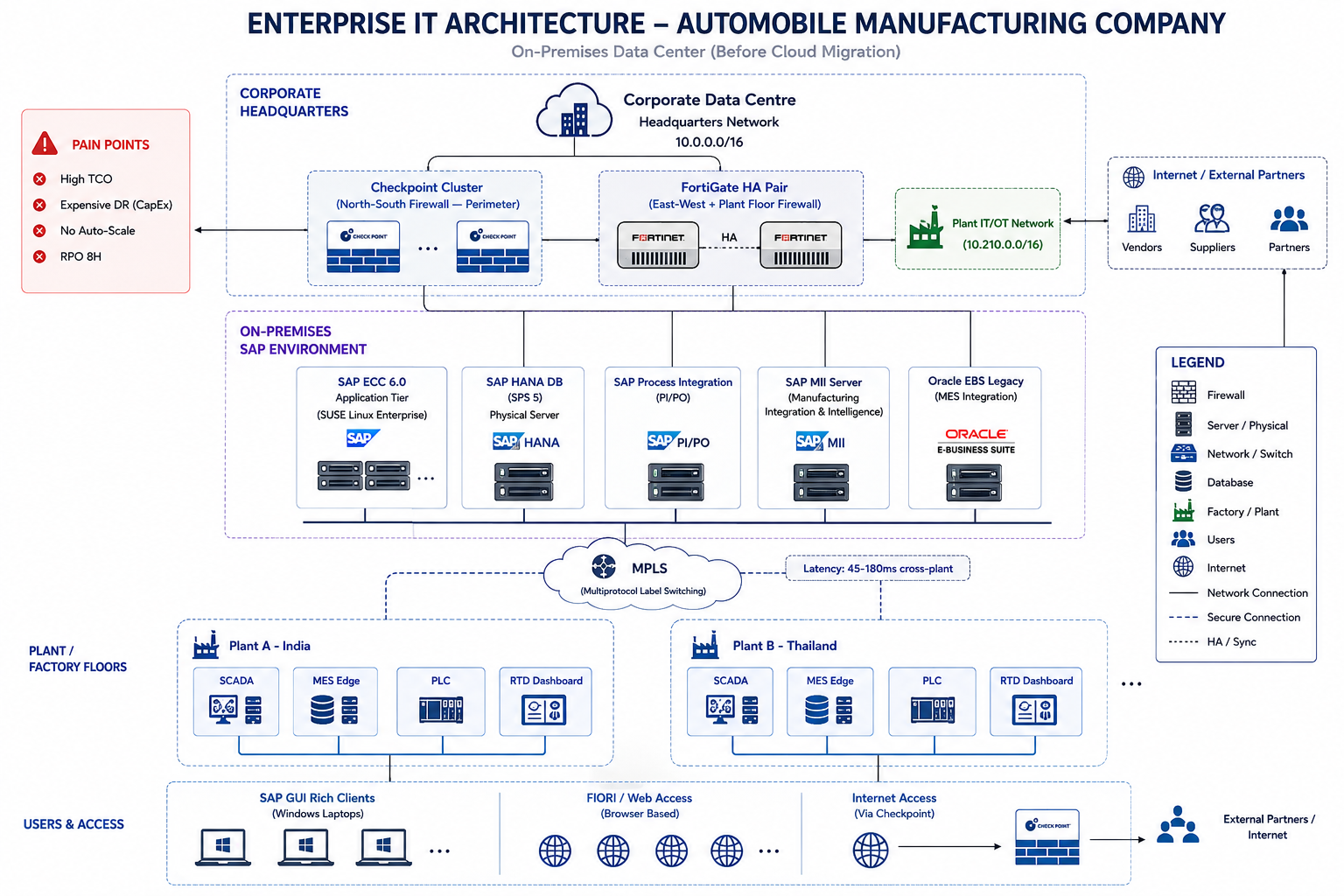
- Check Point cluster: internet / partner perimeter, HTTPS inspection enabled
- FortiGate HA pair: office ↔ plant IT/OT segmentation (10.210.0.0/16)
- SAP ECC 6.0 + SAP PI/PO + SAP MII, HANA database on physical servers
- MPLS WAN between Plant A and Plant B
- DR = tape backup. RPO 8 hours, RTO unmeasured
“Every layer worked — but none of it could fail over. The real risk was not a hardware failure; it was a site-level disaster with no testable recovery path.”
The Plan — Hybrid, Not Rip-and-Replace
We did not propose a full rip-and-replace. The plants, the OT segment, and the two firewall ecosystems were serving the business well. Our recommendation was a hybrid model:
- SAP ECC 6.0 → SAP S/4HANA on AWS (eu-west-1) via brownfield conversion, preserving all 14 years of data
- Check Point and FortiGate stay in place at the edge — the cloud connects to them, not around them
- Primary connectivity: AWS Direct Connect 10 Gbps. Backup: site-to-site IPSec VPN 1 Gbps
- Transit Gateway hub to connect the SAP VPC, shared-services VPC, and the DR region
- Cross-region DR (eu-central-1) with HANA System Replication — RPO 15 min, RTO 1 hour
- Plant OT traffic stays on-prem and reaches SAP through the firewall estate — controlled and audited
The key architectural decision: cloud adoption must not create a firewall bypass. Every route from plant to cloud still crosses either Check Point or FortiGate, so the security team keeps full visibility.
After the Cloud — The New Hybrid Landscape
Post-migration, SAP S/4HANA runs in AWS eu-west-1 with the DR copy in eu-central-1. The on-premises footprint shrank to the plant OT layer and the firewall estate. Direct Connect and the VPN feed into a Transit Gateway, which attaches the SAP VPC, shared services, and the DR VPC. HANA System Replication keeps the DR region warm at RPO 15 minutes.
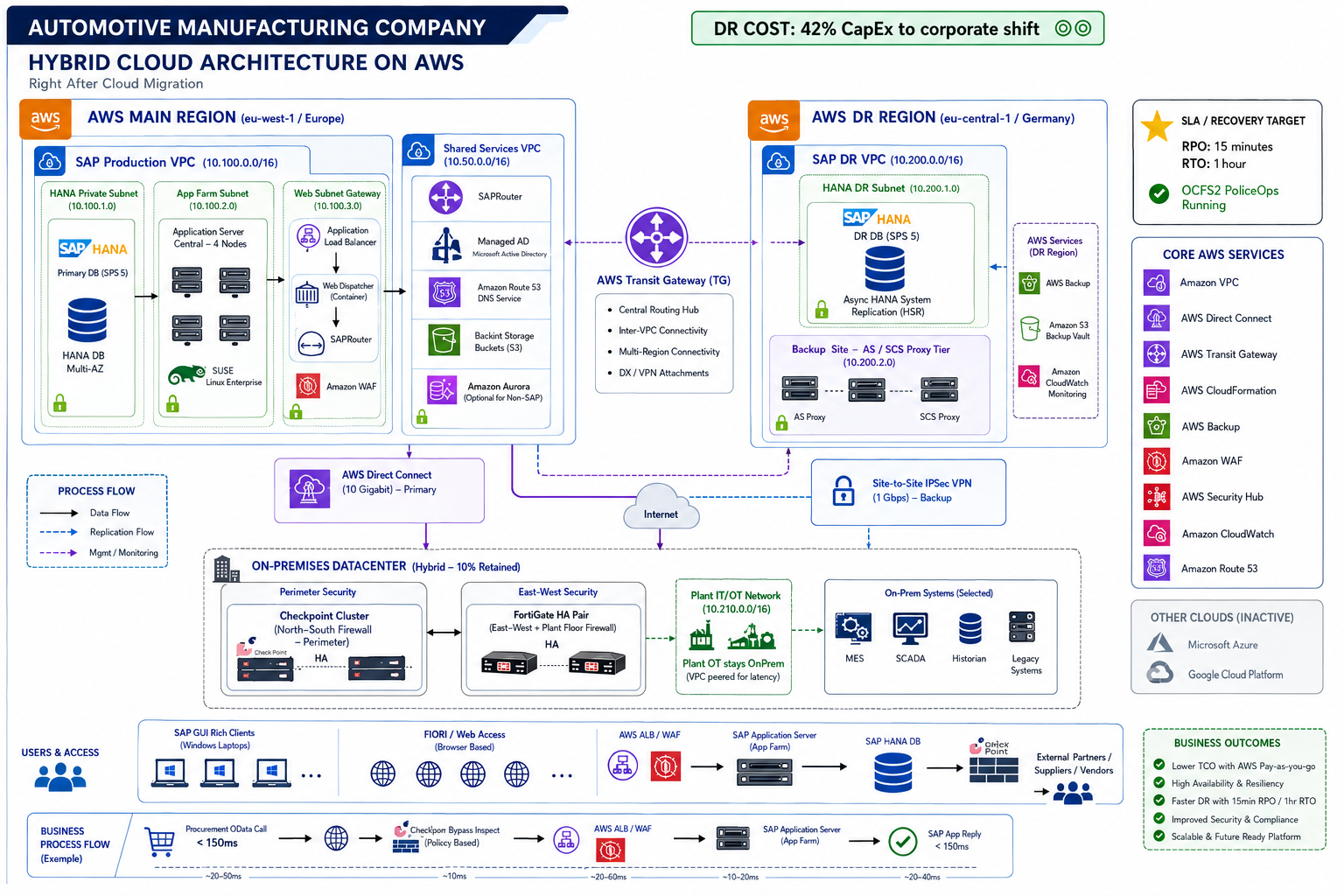
- SAP Production VPC (10.100.0.0/16): HANA, App Servers, Web Dispatcher, ALB
- Shared Services VPC (10.50.0.0/16): SAP Router, AD/DNS, backup buckets
- DR VPC (eu-central-1, 10.200.0.0/16): HANA standby via async System Replication
- Transit Gateway hub: DX + VPN attachments, VPC-to-VPC routing
- On-prem: Check Point + FortiGate retained, now terminating Direct Connect/VPN
Real Incident #1 — SAP OData Timeouts at the Check Point
Three weeks after go-live, the procurement team reported a repeating failure: SAP MII transactions to the legacy order system returned 'Connection to partner broken' after roughly five minutes. OData calls from SAP to the Oracle EBS API were timing out with HTTP 503 — at exactly 120 seconds, every time.
🔍Diagnosis
Ping and routing were fine — so this was not a network outage. The timing pattern (a flat 120-second timeout) pointed at an intermediary that was terminating the TLS session and holding the payload. That intermediary was the Check Point perimeter cluster running HTTPS deep inspection.
- Rule 17: source = SAP MII server, destination = Oracle EBS API, service = https, action = Inspect
- Each inspected OData request added ~2,500 ms of certificate-validating latency on a chatty 244 KB XML payload
- The SAP app server hit its ICM receive-timeout before the response arrived, and killed the session
- The result: 503s, 'session aborted by server', and a blocked procure-to-pay process
🛠️Fix
We created a precise bypass rule for this one integration — not a broad inspection exemption. Only the SAP MII server → Oracle EBS API HTTPS flow was moved from 'Inspect' to 'Bypass', after the security team approved the exception and confirmed the endpoint was a trusted internal API.
| Before | After |
|---|---|
| HTTPS deep inspection on MII → EBS API flow | Targeted bypass rule for MII → EBS API only |
| ~2,500 ms added latency per OData call | 18 ms handshake; requests complete in normal time |
| 120-second ICM timeout aborts the session | No more 503s; procure-to-pay restored |
| All other inspection rules untouched | All other inspection rules untouched |
SLA result: 55 minutes to detect, ~1 hour to root-cause, 35 minutes to fix. Total restore time under 2 hours 30 minutes — within the agreed 99.95% availability target.
Real Incident #2 — Asymmetric Routing Breaks DR Failover
During the first full disaster-recovery drill, HANA replication itself was healthy — but the DR application tier could not be reached. Plant users could ping the DR SAP instance (ICMP worked) yet TCP connections never completed. This is the classic signature of asymmetric routing.
🔍Diagnosis
The forward path (plant → FortiGate → Direct Connect → Transit Gateway → DR VPC) used the primary 10 Gbps Direct Connect route. But the return path from the DR VPC was being routed back over the backup IPSec tunnel — which the FortiGate treated as a lower-priority but still valid path. TCP SYN travelled one way, SYN-ACK the other: sessions never established.
- FortiGate routing table: 10.200.0.0/16 reachable via BOTH Direct Connect and the IPSec backup tunnel
- SD-WAN member priority was not pinned for DR VPC destinations — the VPN won the return path
- Check: 'get router info routing-table bgp' showed the wrong next-hop preference
- Fix location: FortiGate SD-WAN member priority + destination-based routing policy
🛠️Fix
We pinned the DR VPC route to the Direct Connect interface as priority 1, demoted the IPSec tunnel to priority 10 for that destination, and added a destination-based routing policy so 10.200.0.0/16 always egresses the Direct Connect interface. The asymmetric path disappeared immediately.
| Layer | Change |
|---|---|
| SD-WAN members | DC_eng1 (Direct Connect) set priority 1 for 10.200.0.0/16 |
| SD-WAN members | Vpn_Backup demoted to priority 10 for the same destination |
| Destination policy | 10.200.0.0/16 always routes out Direct Connect interface |
| Verification | BGP table re-checked; TCP 3-way handshake completes on both paths |
Lesson codified into every future build: whenever two redundant paths exist to the same destination, pin the preferred path per destination. Do not rely on priority alone — verify with a full TCP handshake test, not just ICMP.
The Results
“The two firewall vendors are still on the network diagram — exactly where they should be. The difference is that the system they protect can now survive a site-level disaster and restore in under an hour.”
Lessons for Your Migration
| Lesson | Takeaway |
|---|---|
| Inspection breaks chatty APIs | Audit HTTPS inspection rules for every long-running integration before go-live; use targeted bypasses, not broad exemptions |
| Two paths = asymmetric risk | Pin preferred routes per destination whenever redundant connectivity exists; test with TCP, not ping |
| DR is only real after a drill | Schedule failover drills quarterly — the first drill is where the real problems surface |
| Firewall estate is an asset | Keep existing security tools in the loop for hybrid traffic; cloud adoption should not bypass the perimeter |
| Sizing must come from data | HANA sizing from real database metrics, not rule-of-thumb — it is what keeps the bill honest |
Every engagement begins with a free, no-obligation assessment. Contact Krizia Technologies to book yours — and let's design your hybrid SAP journey the same way: one accountable partner, end to end.
The End
Let's Solve Your Problem Together
Every engagement starts with a free, no-obligation assessment. We will tell you exactly where you stand, what needs to change, and what it will cost.
Prepared by Indresh Pratap Singh · © 2026 Krizia Technologies. All rights reserved. · Case study anonymized for confidentiality